Embedded software has the hardest job description in our industry. It has to run for years without a reboot. It has to fit in whatever RAM and flash the bill of materials allowed, because every chip you add is paid for again on every unit you ship. It has to respond instantly on a CPU slower than a phone from five years ago. And now it also has to look like the phone app, talk to the phone app, and report to a cloud service, because that’s what customers expect from anything with a power cord.
Most teams solve that with three or four stacks. C or C++ on the device for size and control, a browser or Qt for the screen, Swift and Kotlin for the companion app, something else on the server. Every boundary between them is a protocol written twice and a bug waiting to happen.
Codename One now runs on embedded Linux, and it covers every one of those pieces with one Java or Kotlin codebase. On our benchmark, the UI drew an animated gauge in 18 MB of memory with no GPU, about a twentieth of what a Chromium kiosk needed to draw the same thing. The headless backend served 379,900 requests per second on two cores, 1.3 times Rust’s axum. And we don’t charge royalties.
Coming This Week
Today is the embedded story. Then one post a day:
- Saturday, November 7: Dash: An Endless Runner That Races Through Your City. A game template that turns from 2D into 3D mid-run, builds levels from real streets, and lets friends race with voice chat.
- Sunday, November 8: Pulse: Heart Rate Zones From the Watch to the Trainer's Screen. A gym and studio template built around HealthKit, Health Connect and Bluetooth heart rate straps.
- Monday, November 9: Real-Time Java: Control Loops the Garbage Collector Never Stops. What real time means, why it’s hard for a managed language, and how we do it.
- Tuesday, November 10: Packaging Java Apps for Xbox Developer Mode, and Why Consoles Need Help. One build hint today. Shipping to consoles needs help we can’t get alone.
- Wednesday, November 11: Port Your Spring Code With Fewer Edits, and Libraries That Bring Their Own Server. Logging, typed JSON, CORS, content negotiation and more of the JDK in the backend, plus cn1libs with a server half.
- Thursday, November 12: Debug Your Dart in a Java Debugger, and JFX Central on a Phone. Dart call stacks, Flutter fixes from a real port, a faster web port and a real JavaFX app on an iPhone.
Two flavors, two kinds of product
The port comes in two flavors. The easiest way to explain them is with two products.
A point of sale terminal: the UI flavor
A POS terminal lives or dies on price. It needs a responsive touch screen, a receipt printer on a serial port, a card reader, and it has to sync with the store’s back office. The merchant buys a hundred of them, so ten dollars of hardware is a thousand dollars on the order and the difference between winning and losing the deal.
A GPU is one of the first things you’d like to cut. Android won’t let you: AOSP needs a board support package with a GPU driver. Flutter can limp along without one, if Mesa emulates OpenGL on the CPU, and on our gauge that took 1.4 CPU cores and 112 MB. A Chromium kiosk runs in 400 MB of RAM. Codename One draws in software by default, through DRM/KMS or the Linux frame buffer, with no X11 or Wayland. It needs nothing from the board but a frame buffer, so the cheapest SoC that drives your screen is enough.
software renderer] --> F[Frame buffer] U --> P[Receipt printer
serial port] U --> R[Card reader
NFC / USB] end U -->|shared DTOs, REST| C[Back office backend] M[Manager's phone app] -->|same DTOs| C
When the board does have a GPU, set one build hint (or let the board profile choose it) and the same renderer composites through GBM, EGL and GLES 2. The frames are identical to the software output; the CPU time per frame drops. If the GPU driver turns out to be broken, the app logs why and falls back to software instead of showing a black screen.
The screen code is the code you’d write for a phone. Your POS app, the manager’s phone app and the back office share the same entity classes, so a change to the receipt format breaks the build rather than a store.
A robot vacuum: the headless flavor
A robot vacuum needs a brain but no screen. The UI is the phone app. The device has to read its sensors, drive its motors, expose an API the app can find on the local network, accept only the owner’s phone, take updates and keep working when the Wi-Fi drops. Every component inside it is multiplied by every unit sold, so memory and CPU headroom cost real money for the life of the product.
That’s the backend flavor: the same Codename One backend that runs your cloud server, compiled to a native executable for the board. REST endpoints, WebSockets, the ORM, MQTT, Bonjour discovery and mutual TLS for device identity are all there, next to the hardware API.
native executable] --> H[Motors, bump sensors, battery
GPIO, I2C, PWM] B --> L[Real-time motor loop] end A[Phone app] -->|Bonjour, then REST + WebSocket
mutual TLS| B B -->|outbox when online| C[Cloud backend
fleet, updates] A -->|away from home| C
A controller on the vacuum is a Spring-style class that reads the hardware directly:
@RestController
@RequestMapping("/api/robot")
public class RobotController {
    private final I2cDevice fuelGauge;

    public RobotController() throws HardwareException {
        fuelGauge = Hardware.getInstance().openI2c(1, 0x36);
    }

    @GetMapping("/battery")
    public BatteryDto battery() throws HardwareException {
        return new BatteryDto(fuelGauge.readRegister(0x04));
    }
}
The phone app compiles against the same BatteryDto. It finds the vacuum with Bonjour when it’s on the same network and goes through the cloud backend when it isn’t, and the API is the same either way.
Competitors that need a GPU, gigabytes and a prayer
We ran the same workload in five toolkits: an 800 by 480 gauge with a sweeping arc, a needle and a bold percentage, redrawn every frame and capped at 60 frames per second, in software. Same Debian arm64 container, three runs each, median shown.
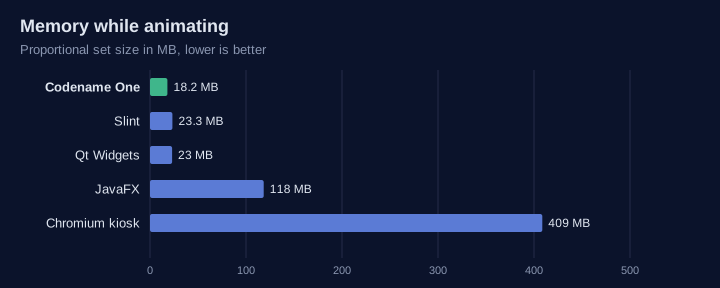
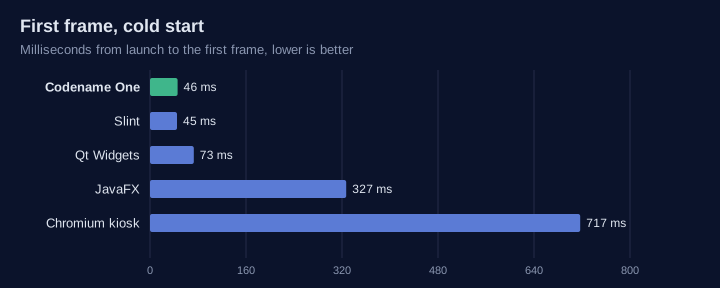
| Toolkit | First frame, cold | Frames per second | Memory (PSS) | On disk (files mapped) |
|---|---|---|---|---|
| Codename One | 46 ms | 57 | 18 MB | 15 MB |
| Slint 1.8 | 45 ms | 51 | 23 MB | 4.3 MB |
| Qt 6.4 Widgets | 73 ms | 62 | 23 MB | 73 MB |
| JavaFX 26 | 327 ms | 62 | 116 MB | 102 MB |
| Chromium kiosk | 717 ms | 60 | 398 MB | 378 MB |
| flutter-pi, GPU emulated on the CPU | 767 ms | 59 | 112 MB | 233 MB |
| Android (AOSP) | needs a GPU and a BSP |
Read that table as a hardware budget. The kiosk browser, the stack most teams reach for when they want “modern UX”, needs 22 times our memory and 25 times our disk to draw one gauge, and takes three quarters of a second to show it. JavaFX, the other way to put Java on a board, needs six times our memory. Flutter does run without a GPU, but only by emulating one: it held its frame rate on 1.4 CPU cores, where we used 6% of one, in six times our memory and fifteen times our disk. Android can’t run without a GPU at all. We’re the only Java option in the table that fits on the board you’d actually want to pay for.
The container ran on an Apple Silicon Mac, not a board, so a real board will be slower. Compare the rows against each other, not against your hardware. Slint needs less disk than we do, and Qt pushes a few more frames. Our form also draws more than the others: a title bar, a button, a slider and a label around the gauge. The flutter-pi row is a release build of the same gauge drawing to the kernel’s virtual display, because flutter-pi needs a display device; the others drew to memory. LVGL isn’t in the table either. It’s a low-level C graphics library: its widgets are drawn objects you wire up by hand, with no component model, data binding, navigation, networking or storage around them. Comparing it with a full application toolkit wouldn’t be a fair test of either.
The headless flavor ran its own benchmark: a small JSON service pinned to two cores.
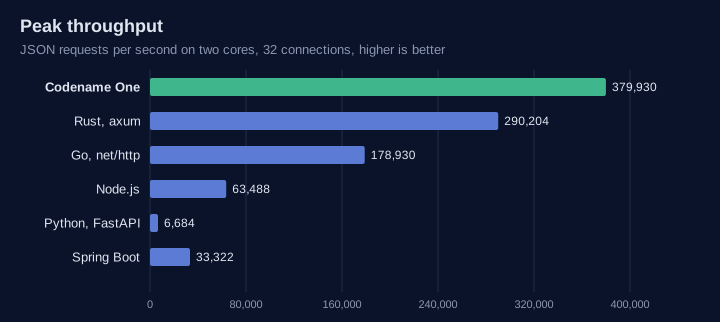
| Runtime | Start | Idle memory | Peak requests/s | p99 at peak |
|---|---|---|---|---|
| Codename One backend | 40 ms | 9.2 MB | 379,900 | 0.22 ms |
Rust, axum | 35 ms | 1.6 MB | 290,200 | 0.25 ms |
Go, net/http | 48 ms | 5.2 MB | 178,900 | 0.59 ms |
| Node.js | 147 ms | 48 MB | 63,500 | 1.1 ms |
| Spring Boot 3.5 | 1,340 ms | 164 MB | 33,300 | 3.3 ms |
| Python, FastAPI | 270 ms | 42 MB | 6,700 | 11 ms |
Rust and Go use less memory. But a Java backend that serves 1.3 times Rust’s peak at a lower p99, and starts 33 times faster than Spring Boot in an eighteenth of its memory, changes what you can put in a vacuum. Like Rust, our server makes two system calls per request and allocates nothing but the object the handler returns. CI reruns this on arm64 with every change to the backend runtime and fails the build if we fall below Rust. The harness is public, so check our Rust setup.
The only stack that goes from the vacuum to the browser
Here’s what I think matters more than any single number. Look at what each option covers:
| Device UI | Headless device | Real-time loop | iOS and Android | Desktop | Web | Cloud backend | |
|---|---|---|---|---|---|---|---|
| Codename One | yes | yes | yes | yes | yes | yes | yes |
| Qt | yes | Qt Core | no | yes | yes | WebAssembly | HTTP server module |
| Slint | yes | no | no | Android, iOS preview | yes | WebAssembly | no |
| Flutter (flutter-pi) | GPU, or emulated on the CPU | no | no | yes | yes | yes | no |
| Chromium kiosk | yes | no | no | as a web app | as a web app | yes | no |
| Android (AOSP) | GPU only | no | no | Android only | no | no | no |
Nobody else gives you a device UI, a headless device, a real-time control loop, the phone app, the desktop app, the web app and the cloud server from one language, one build and one set of classes. That’s the “super full stack”: the entities, the DTOs and the API contract live in a shared module that every target compiles against. A field renamed on the vacuum is a compile error in the phone app, not a support ticket. One team can own the whole product, and one security fix lands everywhere at once.
The rest of the ecosystem comes along: Bluetooth LE, NFC, MQTT, Bonjour, the ORM, push, crash reporting and the build tools you already use for mobile.
What it looks like in code
Hardware access is in the core API. GPIO, I2C, SPI, serial, PWM, CAN, the watchdog and the backlight go through the kernel’s own interfaces, with no extra library:
Hardware hw = Hardware.getInstance();
try {
    if (hw.isSupported(Hardware.FEATURE_GPIO)) {
        GpioPin led = hw.openGpioOutput("gpiochip0", 17, false);
        GpioPin button = hw.openGpioInput("gpiochip0", 27,
                GpioPin.BIAS_PULL_UP, GpioPin.EDGE_FALLING);
        button.setListener((pin, rising, nanos) -> {
            try {
                led.setHigh(!led.isHigh());
            } catch (HardwareException e) {
                Log.e(e);
            }
        });
    }
    if (hw.isSupported(Hardware.FEATURE_I2C)) {
        I2cDevice sensor = hw.openI2c(1, 0x48);
        Log.p("Sensor reads " + sensor.readRegister(0));
    }
} catch (HardwareException e) {
    Log.e(e);
}
On a phone, isSupported answers false, so the same class is safe everywhere. In the simulator it runs against a virtual board with 32 GPIO lines, a TMP102 temperature sensor, an EEPROM and loopback SPI, serial, and CAN. You can write and unit test the hardware code before the board arrives.
Getting it onto the board is one command. It builds, copies the executable over SSH, installs it as a systemd service and follows the log:
mvn cn1:runOnDevice -Dcn1.board=rpi5 -Dcn1.device.host=pi.local -Dcn1.device.user=pi
Board profiles cover the Raspberry Pi family, i.MX 8 and i.MX 6, RK3588, Jetson, BeaglePlay and generic arm64, armv7, x64 and RISC-V. There’s a Yocto layer for production images, and a cross build can point at a Yocto or Buildroot SDK sysroot.
No royalties, and the support embedded actually needs
Embedded UI is usually sold per unit. You ship ten thousand terminals and pay a royalty on each one, which is fine until the product succeeds and the toolkit becomes a line item on every unit you ship.
Codename One doesn’t charge royalties. It’s open source under GPL 2 with the Classpath exception, on devices like everywhere else.
What embedded teams need from a vendor is different. A device ships once and stays in the field for ten years or more. It runs the exact framework version it was certified with, and the team needs a security fix in that version five years from now, not an upgrade to whatever master looks like then. That’s long-term support: a maintained branch for your product, backports of the fixes that matter to you, and someone who answers when the board vendor’s new kernel breaks something.
That runs far past the timeline we normally support, and it’s work we’re happy to do with you directly. It’s a better deal for both sides than a royalty: you pay for the support you use, and the price doesn’t grow with your success. If you’re planning a product, talk to us early so the branch matches your release.
Linux today, other systems and RTOS on request
We only support embedded Linux right now. If your product runs on Zephyr, QNX, VxWorks, FreeRTOS or a vendor OS, tell us. The renderer needs a frame buffer and the backend needs sockets, and ParparVM already emits portable C, so a new OS means porting two layers. Real demand decides which one comes next, and that includes a proper hard real-time RTOS.
More This Week
Real-time threads
A vacuum’s motor loop, or a POS card reader’s timing, has deadlines, and a garbage collector that stops the world is the usual reason people say Java can’t meet them. Codename One now has real-time threads on PREEMPT_RT Linux that the collector never stops:
class MotorLoop extends RealtimeTask {
    private final double[] gains = new double[64];   // allocate up front
    private PwmChannel pwm;

    public void setup() {                            // may allocate
        try {
            pwm = Hardware.getInstance().openPwm(0, 0);
        } catch (HardwareException e) {
            Log.e(e);
        }
    }

    public void cycle() {                            // must not allocate
        // read sensors, compute gains, then pwm.setDutyCycle(...)
    }
}

Realtime.getInstance().start("motor",
        new RealtimeParameters().setPeriodNanos(1000000).setPriority(80).setCpu(3),
        new MotorLoop());
If cycle() allocates, the build fails and names the method and the line. Every thread keeps latency statistics so you can prove the deadline on your own board. Monday’s real-time article explains the terms, what makes this hard for a managed language and how we handle each part.
Dash: race through your city
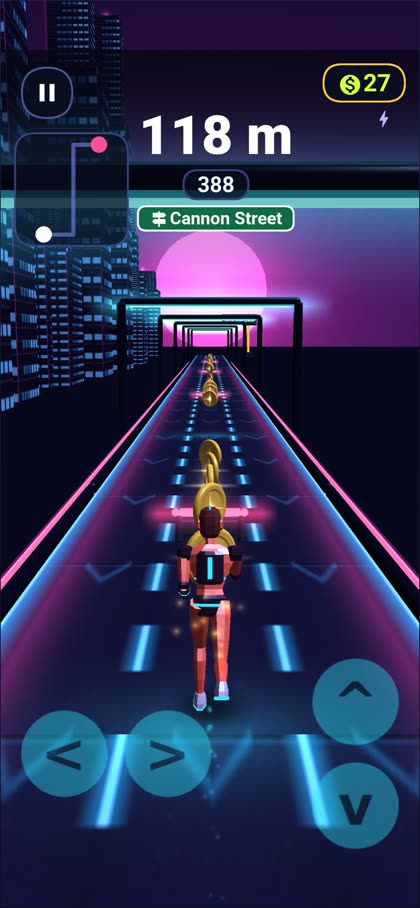
Dash is our second game template: an endless runner whose levels can start as a 2D side-scroller and swing into 3D mid-run. Pick two points on a real street map and the route becomes a level, street names and landmarks included:
CityRoute route = new CityRoute("Old Harbour")
        .leg(420, CityRoute.STRAIGHT, "Quay Street")
        .leg(310, CityRoute.LEFT, "Rope Walk");
LevelDef level = route.level();
The server replays every run to keep the leaderboards clean, and friends race the same track with voice chat. Saturday’s Dash article has the details.
Pulse: heart rates from the wrist to the trainer
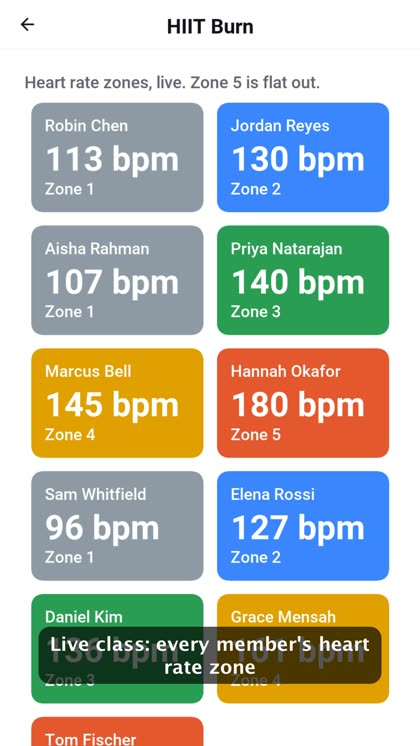
Pulse is a gym and studio template built around health data. A member’s watch or Bluetooth chest strap feeds a workout session, the readings go to the studio’s backend, and the trainer sees every member’s heart rate zone live. Past workouts come in from HealthKit or Health Connect through one API. Sunday’s Pulse article walks through the health code.
Xbox, and help with consoles
codename1.arg.windows.xbox=true builds the native Windows port as a UWP app for Xbox Developer Mode:
CoreWindow, no desktop window] U --> R[Direct2D into a Direct3D swap chain] U --> I[Controller: D-pad and stick to directions
A to fire, B to back] U --> S[TV overscan as the display safe area]
Your game keeps reading Display.getGameAction() as it does on a phone. We haven’t run it on a real Xbox yet, and Developer Mode can’t sell a game. Shipping on consoles needs SDKs behind NDAs, so Tuesday’s Xbox article is also a request: if you can open that door, talk to us.
Port your Spring code with fewer edits
Porting real services to the Codename One backend keeps finding the small things a Spring developer expects. This round closed a batch of them, so code like this now moves over unchanged:
@RestController
@CrossOrigin(origins = "https://shop.example.com")
public class OrderController {
    private static final Logger LOG = Logger.getLogger(OrderController.class);

    @PostMapping(value = "/orders", consumes = "application/json", produces = "application/json")
    public Order place(@RequestBody Order order) {
        if (order.lines.isEmpty()) {
            throw new ResponseStatusException(400, "An order needs at least one line");
        }
        MDC.put("customer", order.customer);
        LOG.info("Placing order with {} lines", order.lines.size());
        return orders.save(order);
    }
}
Json.read(body, Order.class) and Json.write(order) work through codecs generated at build time, String.matches and java.util.regex work, and BigDecimal, YearMonth, Semaphore and ConcurrentLinkedQueue are there. A cn1lib can now also ship its own controllers, entities, and migrations. Wednesday’s backend article has the full list.
Dart debugging, a faster web port and JFX Central
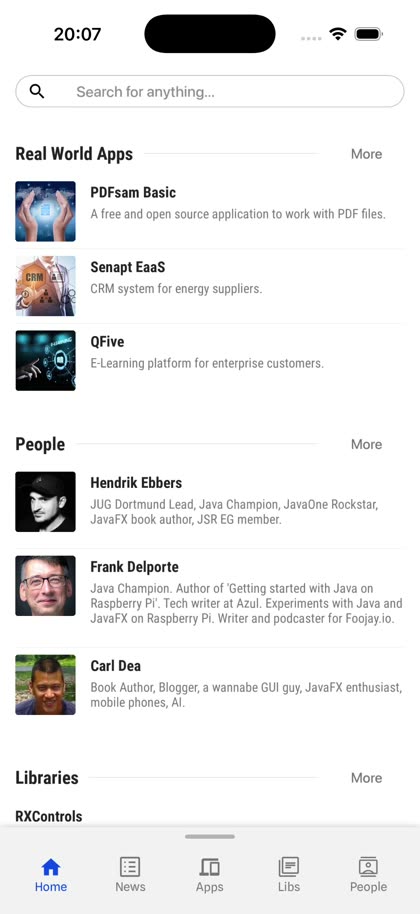
That’s JFX Central, a real JavaFX application written by JavaFX experts, running on an iPhone through our JavaFX layer. It isn’t as polished as an app written for Codename One, but bindings, cells, CSS and remote images all work.
Flutter apps now debug in Dart: the build rewrites the class files’ line tables and adds a JSR-45 source map, so stack traces name your .dart files and the standard Java debugger steps through Dart. The JavaScript port got faster too. It inlines getters and setters, fuses StringBuilder chains into plain string operations and keeps every array packed. String building in our compute suite went from 99 to 68 ms, and every checksum still matches the JVM. Integer division by zero now throws ArithmeticException in the browser, as Java says it should. Thursday’s article covers all three.
Try it
The embedded Linux chapter covers displays, the GPU path, board profiles, deployment, hardware access, the five connected-product shapes and the full benchmark with its method. The harness is in scripts/embedded/bench in the repository if you want to rerun it on your own board. I’d love to see those numbers.
If you’re building a device, tell me what board it runs on and what you’re using today. And if your product needs an OS we don’t support yet, that’s exactly the conversation I want to have.