What do you pay for Spring and Java’s dynamic architecture? Can you deliver the same API without the same runtime cost?
For a small service, you might want dependency injection, transactions and scheduled jobs without a long startup or a large deployment. That is the case our native Java backend is trying to make. Write a controller and a service, compile their wiring into the application, then deploy a native executable.
The HTTP runtime underneath that API is small. In the two-core Linux test below, its lower-level Bench handler occupies 5.17 MiB and reaches its first verified response in 14.8 ms. The same two endpoints in Spring/GraalVM occupy 88.31 MiB and respond in 43.6 ms. This handler uses no controller annotations or generated wiring, so those numbers measure the HTTP stacks, not the cost of the Spring-style API.
This week’s Spring-style API adds the parts that make that approach useful beyond a greeting endpoint: transaction propagation, scoped beans, background tasks, sessions, metrics and MCP tools. ParparVM supplies the native runtime, including virtual threads that can park while a handler waits for PostgreSQL, MySQL or another HTTP service.
This is a Spring-style API, not a drop-in Spring implementation. Its annotations live in com.codename1.backend.annotations. Spring itself supports AOT processing and GraalVM Native Image. Our proposition is a smaller supported surface with direct generated calls, a native runtime shared with our app framework, and code you can inspect when you want to know what an annotation costs.
The backend is still a work in progress. It sits on ParparVM, the runtime behind our native iOS apps, and is maturing rapidly. The local measurements below show where it earns the “smaller, faster” description. They also define the narrow workload being compared.
Coming This Week
Today’s article covers the backend API, generated code and local server comparison. The follow-ups explore what you can do with the rest of the release:
- Saturday, October 3: Honey, I Shrunk Java. How object headers, compiler optimizations and garbage collection affect the memory and CPU your application needs.
- Sunday, October 4: Can You Tell the Difference Between These iOS Tab Bars?. Compare the videos, then see how measured motion and glass formulas make your UI feel closer to UIKit.
- Monday, October 5: Do You Prefer Gradle?. Start with fewer files, build a standalone backend, find the right Javadocs, and try the separate Android Gradle 9 option.
- Tuesday, October 6: Connect Your App to Your Enterprise Traces. Connect your client app and native backend to traces across your enterprise services, with metrics and MCP alongside them.
- Wednesday, October 7: Do You Want Your Web App to Feel Like a Native App?. Use desktop themes and visible menus in the browser. The Certificate Wizard gets the same theme families.
- Thursday, October 8: Don't Order Fish on Monday. Don't Release on Friday. Catch private API imports before submission, and what a difficult Friday release taught us about gaps in testing.
Compare startup, memory, throughput and build time
The measurements use CN1 revision 60c4f310. For the comparison, we ran two small HTTP handlers on the Linux deployment target: a 13-byte plaintext response and a JSON object containing one message field. The CN1 executable uses the repository’s lower-level Bench handler. Spring Boot 4.1.1 uses Spring MVC and embedded Tomcat, running either on Temurin JDK 25 or as a GraalVM 25 native executable.
This compares the selected HTTP stacks, not equivalent framework features. The CN1 handler does not exercise the annotation-generated application shown below. There is no database, TLS, authentication, or telemetry in either application. Both JSON handlers create a map per request; CN1 also allocates a fresh response object.
The host is an Apple M4 Max with 16 logical CPUs and 64 GiB RAM. The local Linux ARM64 VM has four virtual CPUs and 8 GiB. Linux CPU affinity restricts the server to 1, 2, or 4 CPUs. At 1 and 2, the load generator runs on the remaining CPUs; at 4, it shares them with the server. These are actual scheduling restrictions, not just a reported processor count.
Start quickly and ship a smaller executable
The two-core configuration gives the server and load generator separate CPUs. Here are medians from three fresh processes, with the startup range in parentheses:
| Application | First response, ms: median (range), lower is better | Native executable, MiB, lower is better |
|---|---|---|
| CN1 native | 14.8 (5.3-15.1) | 5.17 |
| Spring Boot / JDK 25 | 1,501.1 (1,407.6-1,617.8) | N/A |
| Spring Boot / GraalVM 25 | 43.6 (32.5-45.6) | 88.31 |
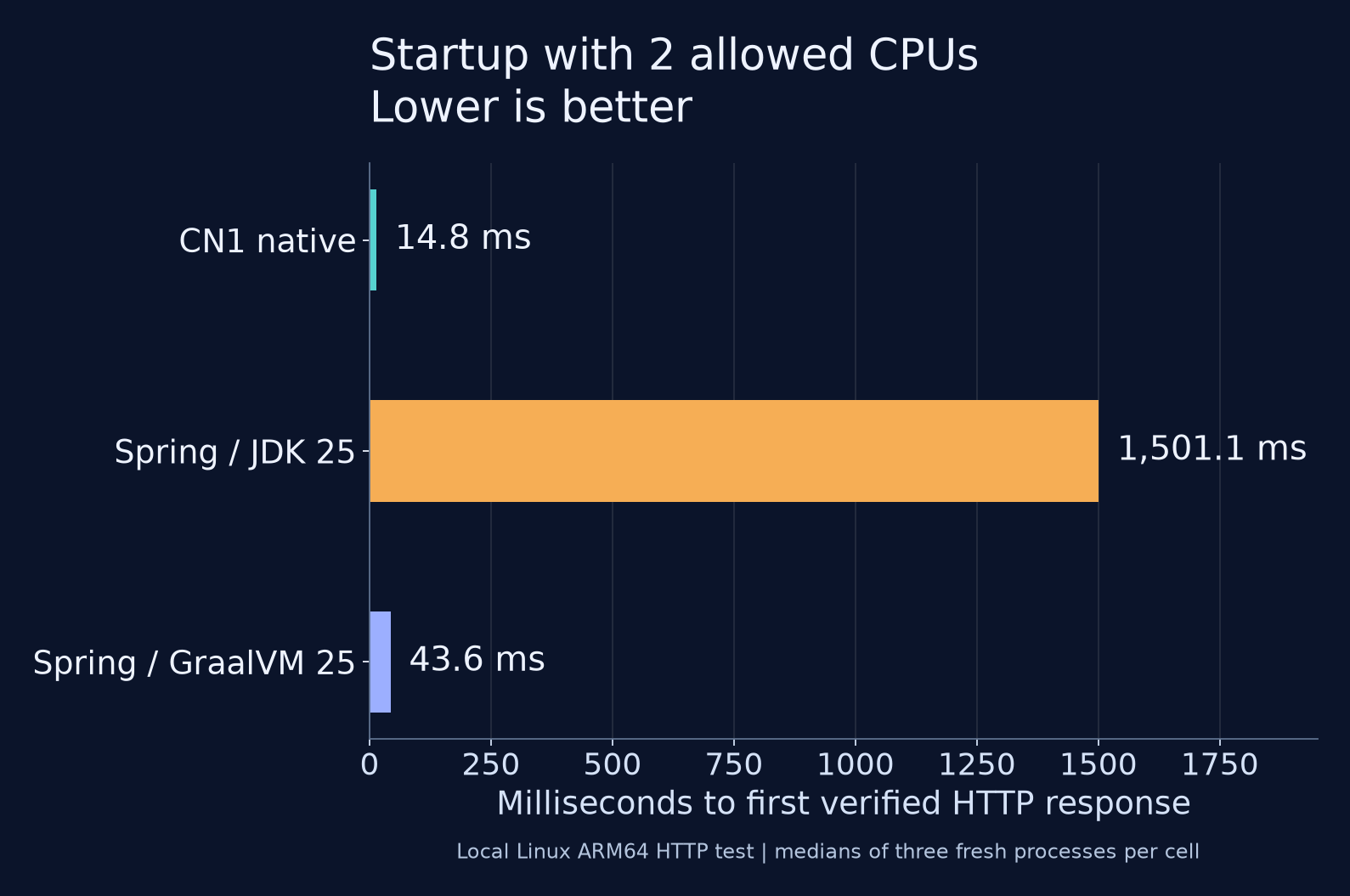
Startup includes spawning the process and receiving a verified HTTP response. File system caches are left warm; this is not a cold-machine or serverless measurement. The polling loop and taskset launcher also contribute to the short native times. The JVM run uses its default runtime settings without an AOT cache.
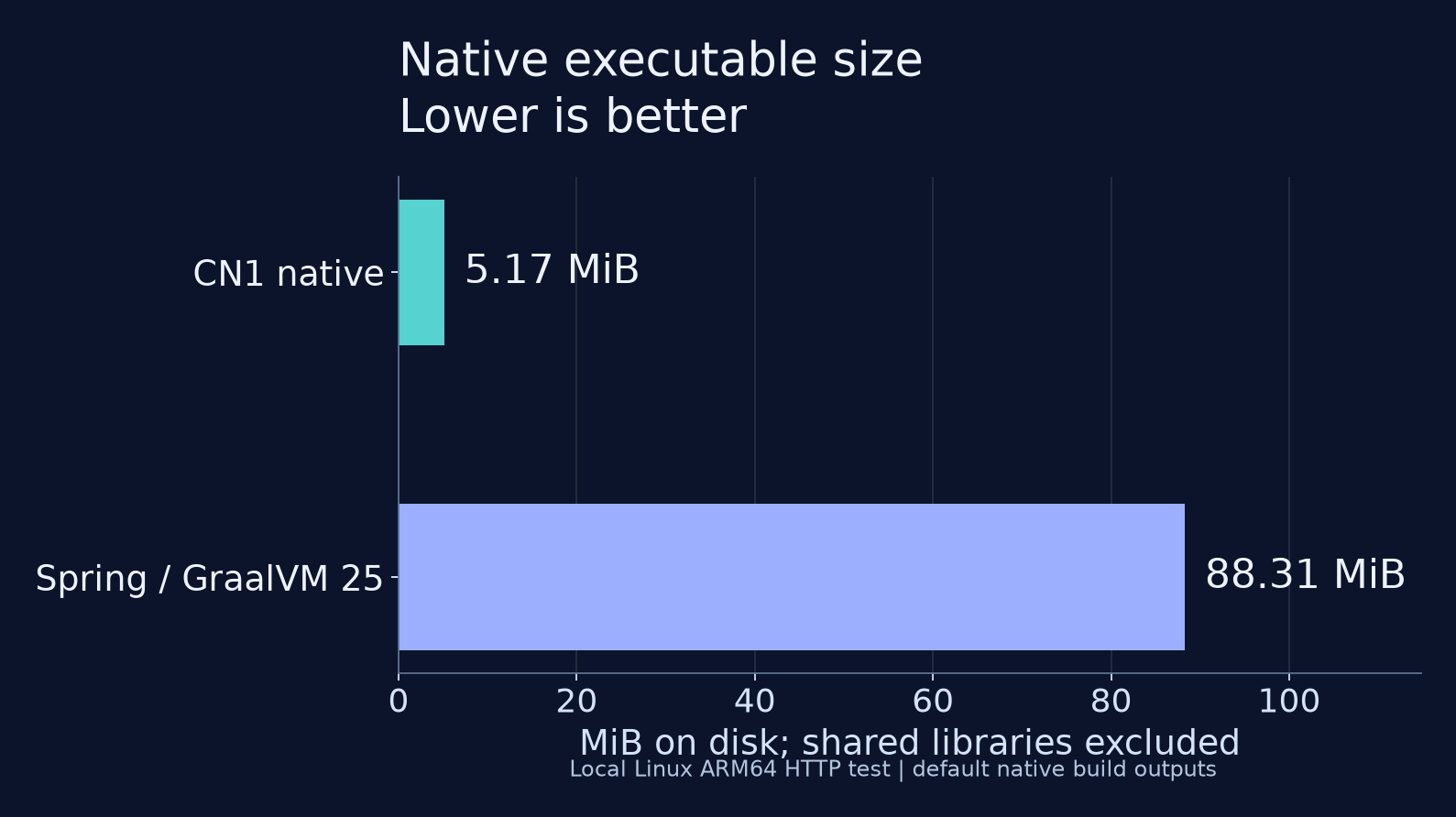
The CN1 executable is 5.17 MiB, compared with 88.31 MiB for this Spring native build. These are uncompressed executable files from the default build outputs. Both files were unchanged by an additional pass that strips symbols. Both builds use shared system libraries, which are excluded here. This is not a container-size or complete-deployment comparison. The JVM column is N/A because its JAR is not a standalone native executable.
Leave more memory for the work your service does
A server’s memory use changes after it starts accepting traffic. We recorded all three stages using the same windows for each runtime:
| Application, 2 allowed CPUs | Idle before load, MiB | Peak through load, MiB | Idle after load, MiB |
|---|---|---|---|
| CN1 native | 10.0 | 57.8 | 29.8 |
| Spring Boot / JDK 25 | 163.0 | 282.2 | 282.3 |
| Spring Boot / GraalVM 25 | 78.1 | 117.0 | 79.6 |
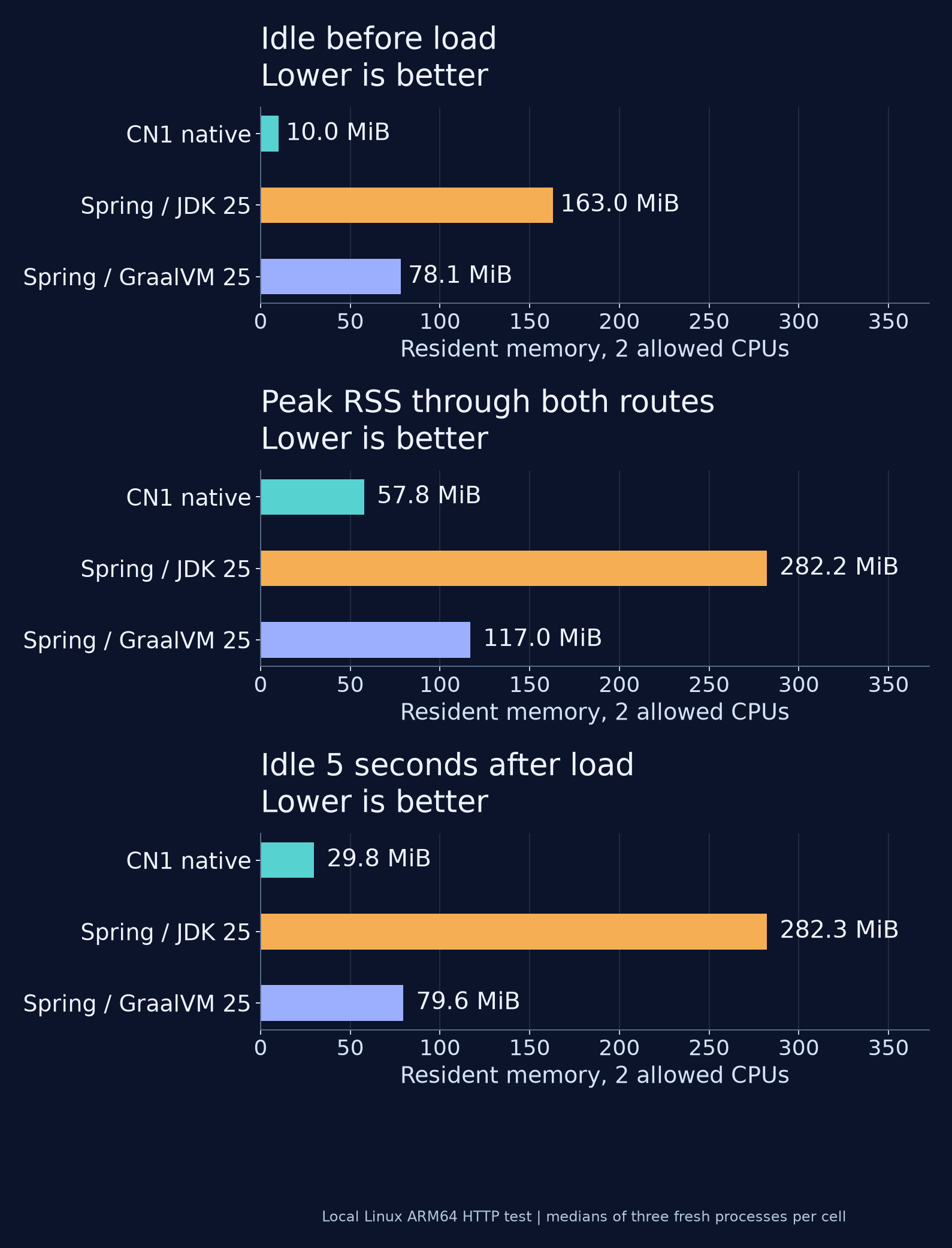
Lower is better in all three memory columns. Idle before load is sampled three seconds after the first verified response. Peak is the kernel’s resident-memory high-water mark through startup and both routes. Idle after load is sampled five seconds after traffic ends, without forcing collection. Each table entry is the median of the three process measurements.
CN1 uses less resident memory in both the idle and loaded measurements here. Four-byte object metadata is only one part of that cost. RSS also includes code, stacks, allocator pages and library state; it is not the live Java heap. This Linux build uses native virtual threads, so its connection costs differ from a platform-thread pool.
Serve requests with 1, 2 or 4 CPUs
| Allowed server CPUs | Application | Plaintext requests/s | JSON requests/s |
|---|---|---|---|
| 1 | CN1 native | 164,542 | 138,555 |
| 1 | Spring Boot / JDK 25 | 34,721 | 64,068 |
| 1 | Spring Boot / GraalVM 25 | 40,286 | 39,167 |
| 2 | CN1 native | 287,997 | 261,121 |
| 2 | Spring Boot / JDK 25 | 69,953 | 70,491 |
| 2 | Spring Boot / GraalVM 25 | 51,729 | 49,000 |
| 4 | CN1 native | 245,608 | 251,435 |
| 4 | Spring Boot / JDK 25 | 116,491 | 110,530 |
| 4 | Spring Boot / GraalVM 25 | 80,053 | 61,873 |
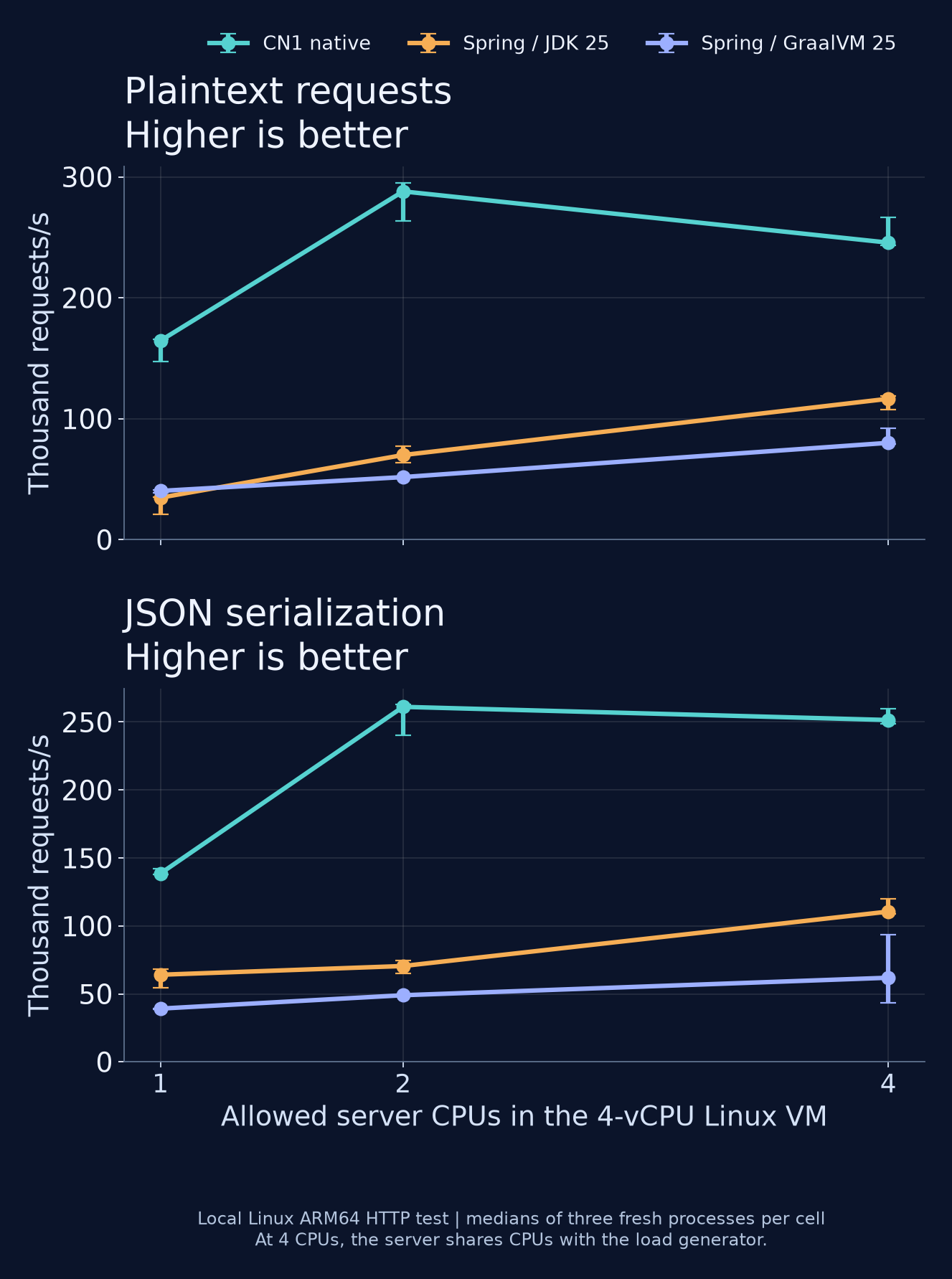
Higher is better. Points are medians; whiskers show the three-run range. Each route has ten seconds of warmup and ten seconds of measurement, using two wrk threads and 32 connections. Plaintext precedes JSON. Four-core points include load-generator contention, so this is not a clean four-core scaling curve.
Does HotSpot catch up after warmup?
CN1 still leads after a minute of warmup per endpoint: 3.9 times the plaintext throughput and 3.4 times the JSON throughput of Spring/JDK 25 in the matched two-core follow-up. Both servers received the same longer warmup, followed by three consecutive ten-second measurement windows for each route.
| Application, 2 allowed CPUs | Plaintext requests/s | JSON requests/s |
|---|---|---|
| CN1 native, 60 s warmup per route | 296,928 | 250,268 |
| Spring Boot / JDK 25, 60 s warmup per route | 75,721 | 73,613 |
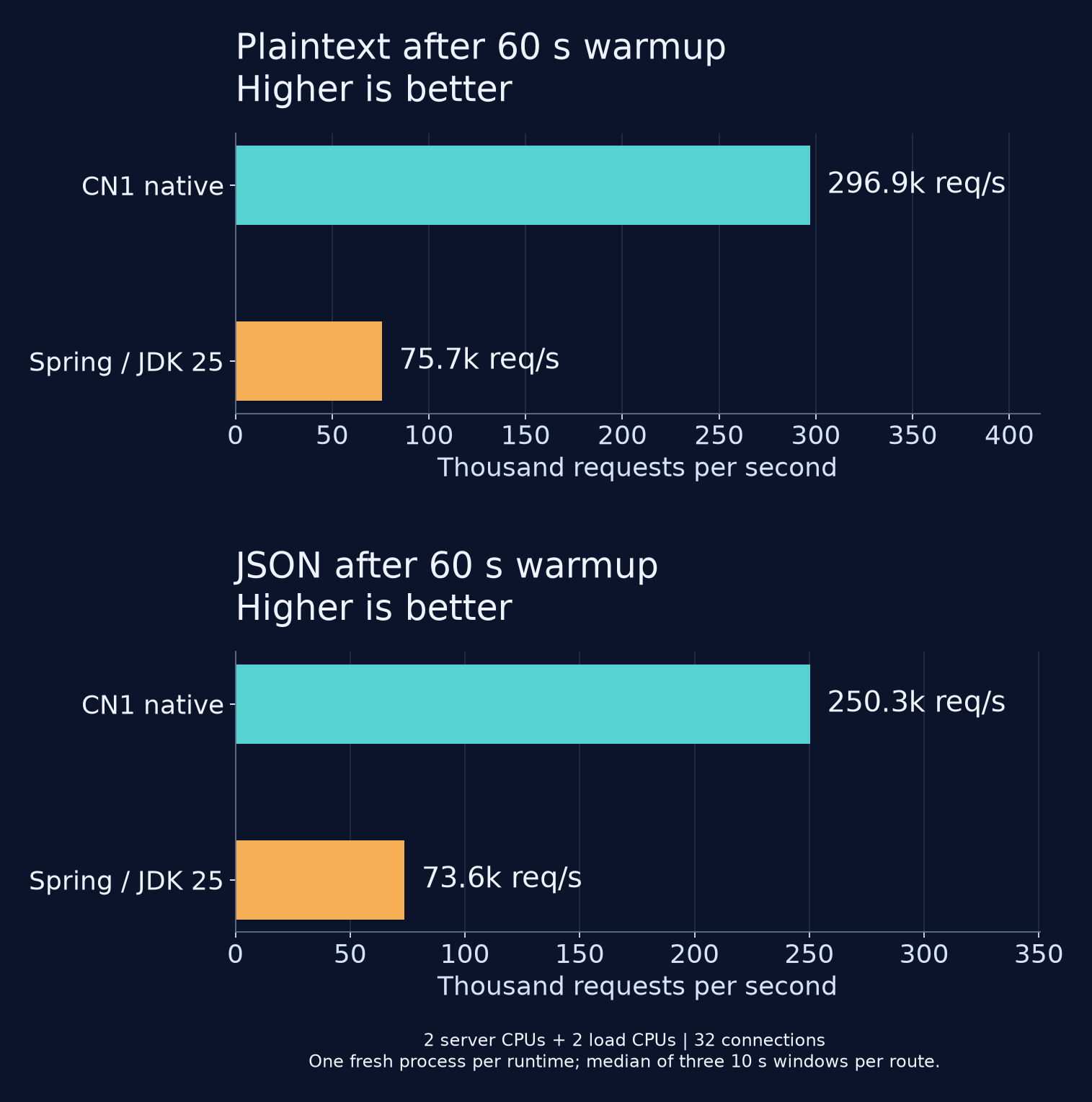
Higher is better. These are medians of three windows within one fresh process per runtime, separate from the three-process matrix above. The server uses CPUs 0 and 1; wrk uses CPUs 2 and 3, with 32 connections. Both routes completed without socket or non-2xx errors.
We checked HotSpot’s compiled-method list during warmup: Spring’s request dispatcher and handler adapter had reached tier-4 compilation. The snapshot is included in the reproduction bundle. The extra warmup does not close the gap for these two handlers. More complex application code, dependencies and different concurrency levels can change that comparison.
The matrix rotates runtime order and reverses CPU order in its middle round. Every response body is checked before load; any socket or non-2xx error during warmup or measurement rejects the run. All 27 process runs completed without those errors. Keep-alive request limits are raised or disabled on both servers; other runtime settings use their defaults.
How long do you wait for a build?
Native compilation moves work out of startup and into the build. You do not need to pay that cost after every edit: CN1’s debug/development mode runs on the JVM, while the native build produces the deployment executable.
| Build | Median elapsed, seconds | Three-run range, seconds |
|---|---|---|
| Spring Boot / JDK 25 | 2.07 | 1.54-2.57 |
| CN1 debug / JVM | 1.67 | 1.57-2.49 |
| CN1 native | 95.34 | 75.43-107.08 |
| Spring Boot / GraalVM 25 | 200.89 | 174.80-214.39 |
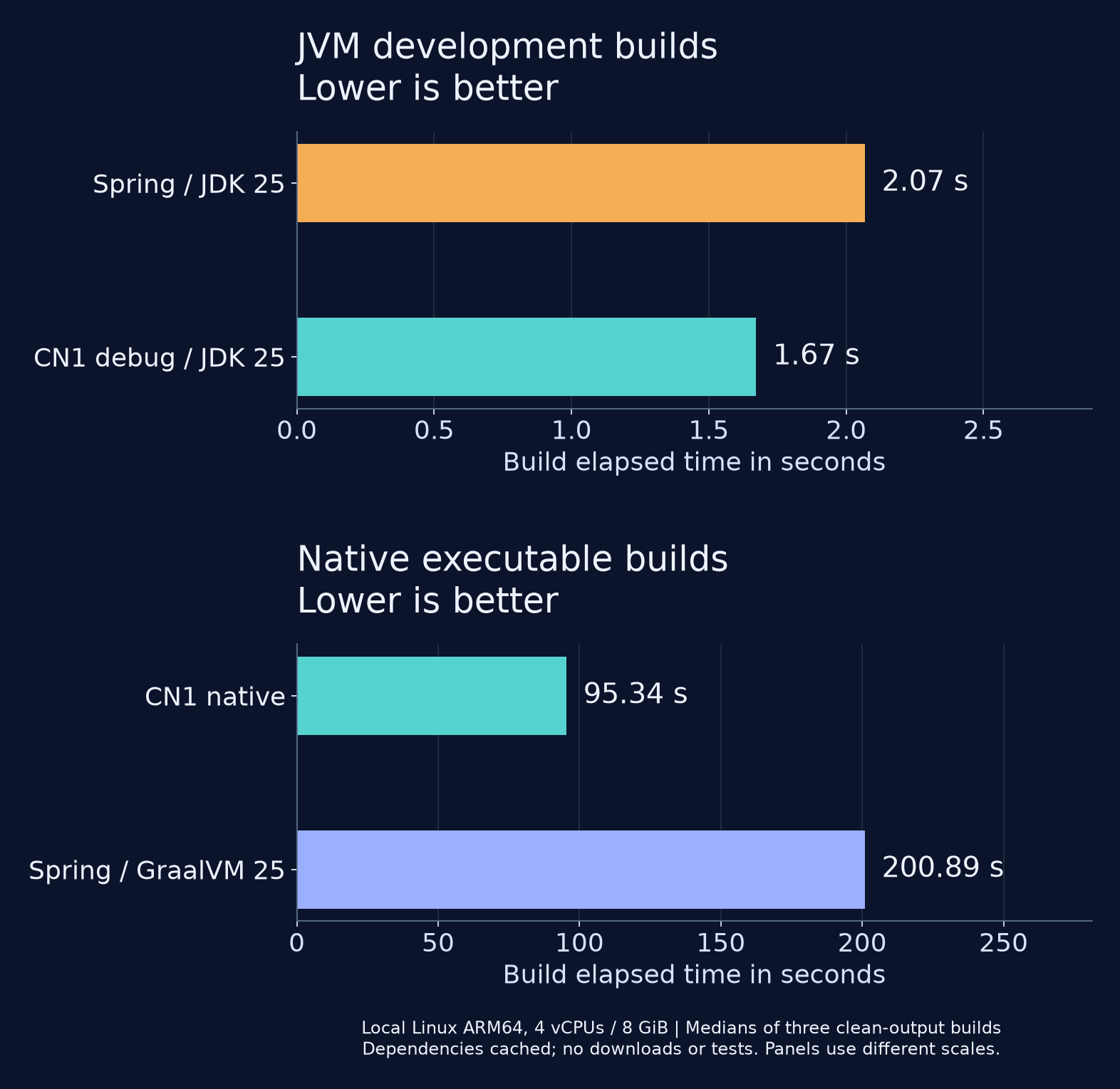
Lower is better. Three builds per configuration, with runtime order rotated, on the same four-vCPU, 8 GiB Linux VM. Application outputs are rebuilt each time; dependencies and toolchains are cached. Downloads, tests and server startup are excluded.
For this example, the CN1 native build takes 53% less elapsed time than Spring/GraalVM. The JVM builds take seconds. That keeps the edit-and-debug loop short while letting you check the native artifact before deployment.
The CN1 development measurement compiles the repository’s Bench handler, JavaSE backend runtime and shared sources with JDK 25. The native path compiles Java with JDK 8, translates it, then compiles and links the generated C with Clang at -O3; the translator and Java API dependencies are prebuilt. Spring uses Maven clean package on JDK 25; its native build adds Spring AOT processing and GraalVM native:compile. These are build-path timings for the HTTP examples, including their different build tools, rather than isolated javac or incremental-build timings.
The reproduction bundle includes sources, commands, artifact hashes, every raw sample, the matched longer-warmup comparison, clean-output build timings, and the controller and transaction examples. The results make a small native backend worth trying for services with these constraints. Measure your own handlers and dependencies before using them to choose deployment capacity.
Start your service with less runtime setup
Here is a complete controller for a backend module:
package example;

import com.codename1.backend.annotations.GetMapping;
import com.codename1.backend.annotations.RestController;

@RestController
public class GreetingApi {
    @GetMapping("/hello")
    public String hello() {
        return "Hello, World!";
    }
}
After javac compiles your sources, the build reads the annotations and generates Java classes for routing, dependency injection and method instrumentation. ParparVM translates the resulting bytecode to C, then the native compiler builds the executable.
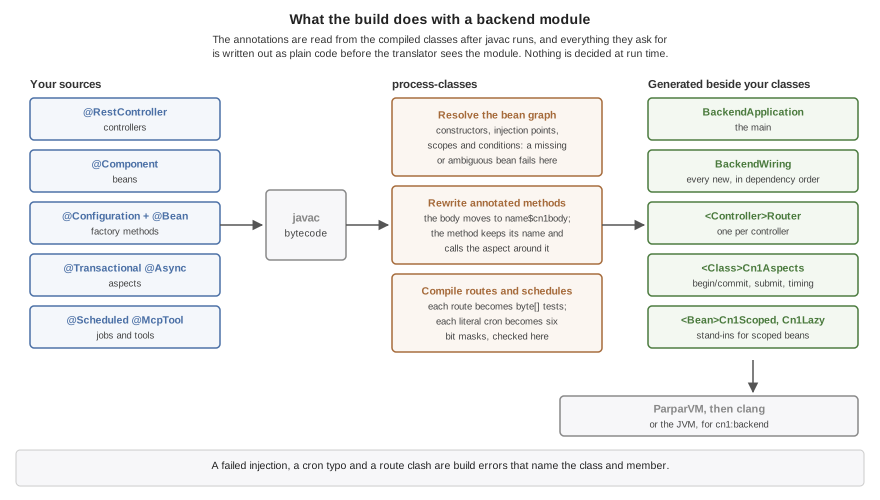
From the current Backend guide. The generated classes are ordinary input to the translator and its dead-code analysis.
A generated Router holds the route as bytes and binds parameters according to their declared types. BackendWiring creates beans in dependency order. Missing dependencies, ambiguous candidates, constructor cycles and duplicate routes fail the build with the relevant class or injection point.
The wiring constructs this controller and the Notes service in the next section with direct calls like these:
b_greetingApi = new example.GreetingApi();
b_notes = new example.Notes(
        com.codename1.backend.Backend.requireDataSource(
                dataSource, "constructor parameter 1 of example.Notes"));
There is no runtime search for a Notes constructor or a matching database bean. The call is in the generated program. With more dependencies, the build orders the constructor calls and emits field or setter injection afterward. A private @Autowired field gets a generated setter so the assignment can still be a direct call.
This gives you a useful debugging option: follow the call into the generated code and see exactly what it constructs. It also lets the native linker remove unreferenced classes. You exchange some of Spring’s runtime flexibility for a build that can resolve more of the application before deployment.
Keep your transaction when you call another method
If you use Spring’s usual proxy-based transactions, a call through this bypasses the proxy. That can make a refactor change transactional behavior even though the annotation is still on the method. Spring documents both the limitation and its bytecode-weaving alternative in the proxying guide.
Our build rewrites the annotated method itself. @Transactional, @Async, @Timed and @Counted therefore apply when another method on the same object calls it. They also apply to private methods and project classes you construct with new.
For example, this service writes a note and an audit row in one transaction. Assume migrations have created note(body) and audit(message) in the configured database:
package example;

import com.codename1.backend.DataSource;
import com.codename1.backend.annotations.Component;
import com.codename1.backend.annotations.Transactional;
import java.io.IOException;

@Component
public class Notes {
    private final DataSource db;

    public Notes(DataSource db) {
        this.db = db;
    }

    @Transactional(rollbackFor = IOException.class)
    public void add(String body) throws IOException {
        db.execute("INSERT INTO note (body) VALUES (?)", new Object[] {body});
        db.execute("INSERT INTO audit (message) VALUES (?)",
                new Object[] {"note created"});
    }
}
What does the annotation become? The build moves the original method body into a separate method and wraps its call in transaction handling. This pseudocode shows the control flow for Notes.add; helper names and generated class layouts are implementation details:
transaction = begin(REQUIRED, readOnly = false, timeout = none)
try:
    call original add(body)
catch error:
    rollback = error is IOException
            or error is RuntimeException
            or error is Error
            or error is DataAccessException
    completeAfterFailure(transaction, rollback)
    rethrow error
commit(transaction)
The body runs inside a transaction boundary regardless of how you reached add. On failure, the wrapper applies the rollback rule to that boundary and rethrows the error. Completing a joined transaction can mark the outer transaction for rollback; it does not necessarily commit or roll back the connection immediately. There is no runtime annotation lookup or proxy dispatch for this method. The processor source and bytecode weaver show how this is implemented.
The database connection is borrowed lazily, at the first database operation. The method can return without touching the pool if it never accesses the database. DataSource, generated DAOs and managed ORM sessions join the transaction associated with the executing thread.
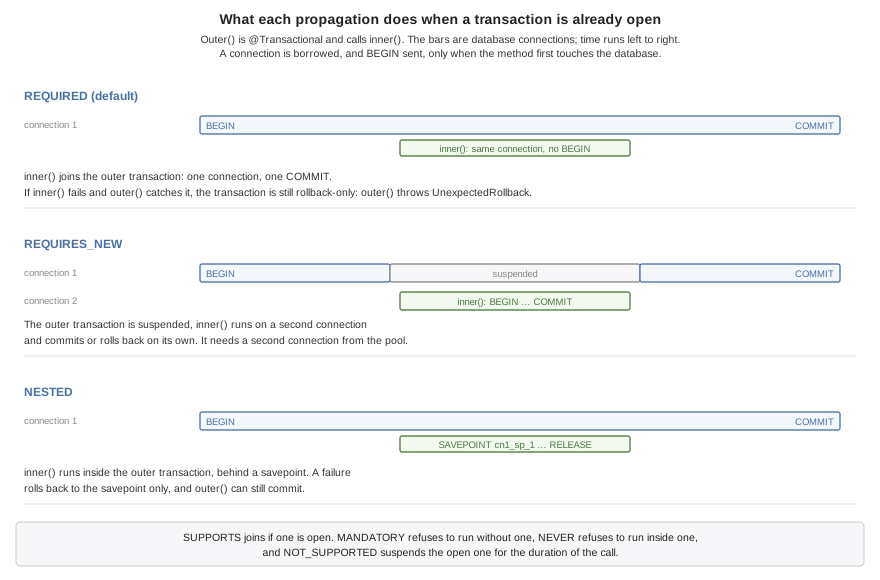
You can choose all seven propagation modes: REQUIRED, REQUIRES_NEW, NESTED, SUPPORTS, MANDATORY, NOT_SUPPORTED and NEVER. The important choices are what you want to happen when a transaction exists, and whether an inner failure should undo the outer work. REQUIRES_NEW needs another connection; NESTED uses a savepoint on the current one.
Read-only declarations, timeouts and explicit rollback rules are supported. Isolation-level selection is not. An asynchronous task does not inherit its caller’s transaction, and a database transaction cannot undo an email or an HTTP request. The data chapter spells out these boundaries, including what happens when code touches more than one connection pool.
Handle more waiting requests without a thread per connection
If your handler spends most of its time waiting for another server, an OS thread per connection is expensive. You want straightforward blocking code without making each wait occupy a host thread.
On the Linux native HTTP path, each connection has a ParparVM virtual thread: a stack retained for the life of that connection. Host threads run those stacks. A host owns its connections and their epoll registrations; a virtual thread stays with that host. When the handler needs bytes that have not arrived, the runtime parks its stack and lets the host run another connection.
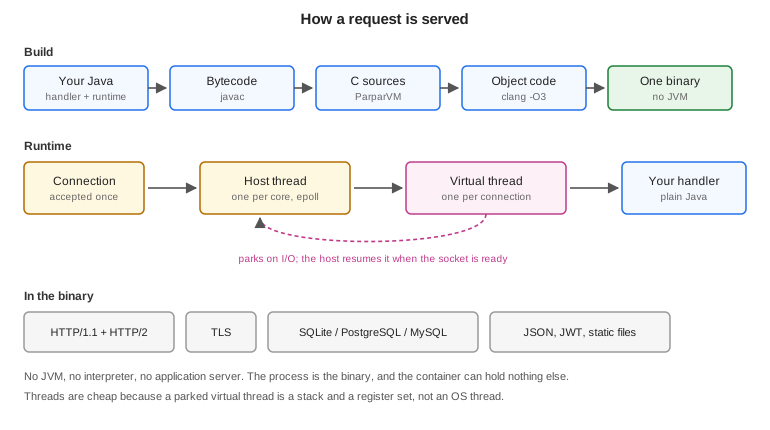
That applies beyond the incoming socket. PostgreSQL and MySQL queries use the same parking mechanism. Outbound HTTP, including its TLS handshake, can park too. Your service can wait for a query in ordinary sequential Java while other connections continue on the same host.
Background tasks now participate in this model too. A virtual task has no incoming connection descriptor, so the host uses a wake pipe to notice newly submitted work. Future.get() on a virtual thread yields cooperatively while waiting for the task. Blocking the host there could otherwise stall the very task whose result the handler needs.
This work also fixed a subtle scheduler failure: each yield site must report whether it is runnable or waiting for I/O. A stale reason could leave a handler stuck after yieldNow() or send an I/O wait back through the runnable path after garbage-collector backpressure. A virtual-thread API is only useful when those transitions remain correct under load.
You still need to choose the right executor for your work:
| Your operation | Native virtual-thread behavior | Practical choice |
|---|---|---|
| Wait for PostgreSQL, MySQL or outbound HTTP | Parks at supported socket waits | Virtual threads suit this work |
Wait on an asynchronous task’s Future | Yields cooperatively | A virtual handler can await virtual work |
SQLite, file access, DNS resolution or Object.wait() | Can block the host thread | Put blocking local work on a platform executor |
| Incoming TLS server connection | Uses the platform-thread pool | Account for pool capacity |
| JVM development run | Uses platform threads, including VIRTUAL tasks | Test native concurrency before deployment |
These are ParparVM’s virtual threads, not the JDK implementation. ThreadKind.PLATFORM remains the default for @Async and @Scheduled; VIRTUAL requests the native facility where available, and AUTO selects it when the server has virtual hosts. The scheduling chapter documents fallback behavior and named executors.
Schedule work without accidental duplicate runs
A scheduled method runs outside the request thread. Use a fixed rate when you want starts at regular intervals, or a fixed delay when you want a pause after the previous run finishes. The distinction becomes visible as soon as the job takes longer than expected:
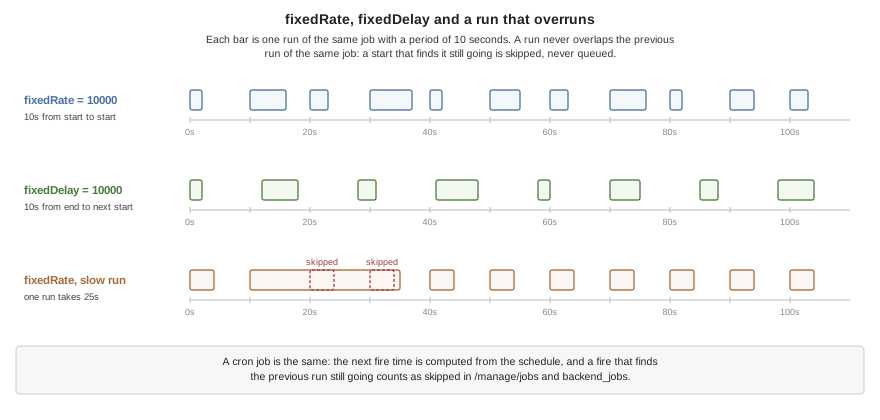
One job does not overlap itself within a process. If a fixed-rate job is still running at its next start, that start is skipped. The build validates the method signature and six-field cron expressions; configuration can supply the actual schedule.
When you deploy several server instances, each instance has a scheduler. A database lock lets them coordinate one job across replicas. For example, @Scheduled(fixedDelay = 60000, lock = "purge") requests a shared lock. The lease must exceed the job’s maximum runtime, since expiry permits another instance to claim it. You can inspect job state and skipped runs through the management endpoints.
Keep configuration and state explicit as your service grows
The Spring-style surface extends beyond the three annotations in a demo:
| What you need | API and behavior |
|---|---|
| Select an implementation | @Primary and @Qualifier resolve competing dependencies |
| Bind deployment settings | @Value and @ConfigurationProperties bind configuration |
| Enable an environment-specific bean | @Profile and @ConditionalOnProperty control activation |
| Construct a library object | A @Bean factory supplies it explicitly |
| Keep state for one request or session | @Scope("request") and @Scope("session") locate the current instance through generated stand-ins |
| Initialize and shut down resources | @PostConstruct and @PreDestroy hooks participate in lifecycle management |
| Measure or manage a service method | @Timed, @Counted, @ManagedResource and related annotations generate adapters |
The build catches unresolved wiring, but runtime configuration can still deactivate a required bean or omit a necessary value. Request, session and lazy stand-ins need a non-final class and an accessible no-argument constructor. That constructor runs for the stand-in too. The beans chapter explains the supported combinations and their restrictions.
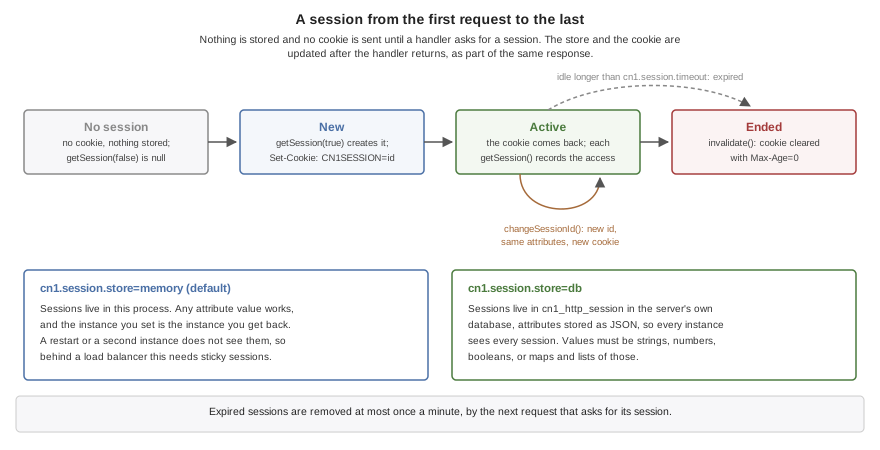
Sessions use an in-memory or database store. They are created on demand, so an API that never asks for a session does not set a session cookie. Rotate the identifier at sign-in with changeSessionId(), and use the database store when multiple instances need to share session state. Session beans run their @PreDestroy or configured destroy method when the session is invalidated, found expired or closed at server shutdown. Expiry cleanup happens when a request encounters the expired session or triggers the periodic purge, rather than at the exact timeout instant.
There is no general ApplicationContext lookup, and an arbitrary JAR on the classpath does not become a compatible Spring bean library. Native backend sources currently use Java 8 language level against the supported runtime library. Packaged deployment targets Linux. Those boundaries help you decide whether a small service fits this backend before attempting a migration.
Keep your service visible across your enterprise
An order can cross a client app, your native backend and several existing services. The backend can continue the incoming trace and propagate it on outbound HTTP calls so your operations team can follow that work in its existing observability system. Optional OpenTelemetry tracing and metrics are compiled into the executable, alongside management endpoints for health, jobs and application resources.
The generated server has a defined request chain. Its own endpoints run before application routes, and static files come last. A wrapper handles request scope, session persistence and request metrics:
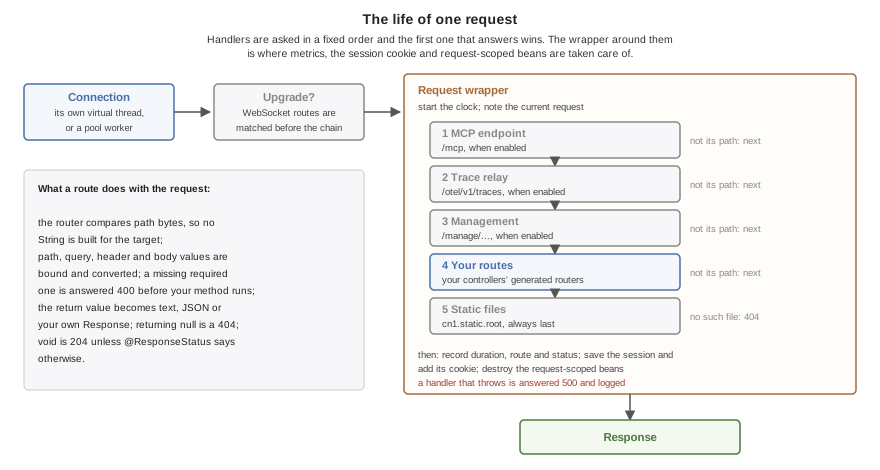
MCP gives your development tools a way to inspect the running service. An agent can list routes and beans, call an endpoint, inspect recent requests, and query database state through the development tools. You can publish application tools with @McpTool; the build generates their argument schemas and direct dispatch.
Development tools are excluded from packaged servers by default. A production MCP endpoint requires a token. Tuesday’s article connects the client and backend to an enterprise trace, then covers metrics and the MCP development workflow.
To try the backend, start with the backend guide and a small endpoint, then add a database operation and verify its rollback behavior. The implementation behind PR #5908 is the basis for this week’s expanded API.
More This Week
That is the backend story. The rest of the release reaches your app’s UI, project structure and submission process. Here is a closer look at each upcoming post, plus a small maps improvement.
How your Java server uses less RAM
Saturday: Honey, I Shrunk Java
The server comparison above puts CN1’s peak RSS at 57.8 MiB, against 117.0 MiB for Spring/GraalVM. Saturday explains the runtime work behind that smaller footprint: four-byte object headers, tighter fields, fewer temporary objects and changes to garbage collection. We will also look at the compiler translating itself faster than JDK 25, and explain how ParparVM’s layout differs from HotSpot’s compact headers and Leyden’s AOT work. Headers are part of the saving; the whole server measurement includes code, stacks and libraries too.
Can your users spot the custom-rendered tab bar?
Sunday: Can You Tell the Difference Between These iOS Tab Bars?
Last week’s iOS 27 theme still had motion I wasn’t happy with. This comparison shows the refinement under taps, holds, and drags. Watch the original video; the small changes in timing and glass detail are the point.
UIKit is above Codename One in this side-by-side simulator recording.
Sunday’s post follows the reverse engineering from frame measurements to spring equations, vibrancy and lens rendering. You can judge the remaining differences and choose when to adopt the theme in your app.
Choose Gradle and start with fewer files
Monday: Do You Prefer Gradle?
You can now start a smaller Gradle project and add platform directories when needed. A standalone backend no longer requires a client project alongside it. That makes the tree easier to navigate and leaves less boilerplate in an LLM’s context. I still prefer Maven XML, for reasons involving the make files I lived with at Sun, but your preference should not block either project shape.
We converted the repository’s HelloCodenameOne sample: 358 files became 305, and nine POMs became two Gradle Kotlin files. That is 53 fewer files around the same application. The count includes sources and resources, excludes generated build output, and comes from the actual converter.
The generated settings.gradle.kts selects the build plugin:
plugins {
    id("com.codenameone") version "8.0-SNAPSHOT"
}
rootProject.name = "HelloCodenameOne"
This is an excerpt; the generated file also configures plugin repositories. Use the release version containing Gradle support when it is published. Monday shows the full setup and conversion commands.
The new backend Javadocs also separate server APIs from the client reference, with shared classes identified between them. Monday covers that split and the separate, experimental Gradle 9 Android build option. Choosing Gradle for your project and changing the Android builder’s Gradle version are independent choices.
Bring your app into your enterprise traces
Tuesday: Connect Your App to Your Enterprise Traces
Your mobile or web app can be the start of a trace that crosses a native CN1 backend, existing Java services and a database. The client and server propagate the same trace context, so compiling the backend to native code need not leave a gap in your enterprise observability. You can use your existing OTel collector and tracing system, with collector credentials kept on the server.
Tuesday explains the setup, sampling and metric labels that keep telemetry manageable as traffic grows, plus MCP tools for checking the service during development. Downstream services must participate in trace propagation too.
Make your browser app feel like a native desktop app
Wednesday: Do You Want Your Web App to Feel Like a Native App?
Your web app can now use native desktop OS styling: macOS (Aqua), Windows (Fluent) or Linux (Adwaita). An optional HTML title and menu bar puts commands above the application. Additional OS windows remain unsupported in the JavaScript port because of browser popup restrictions; that does not exclude Windows browsers. The Certificate Wizard adopts the same desktop theme families, continuing last week’s Settings work.
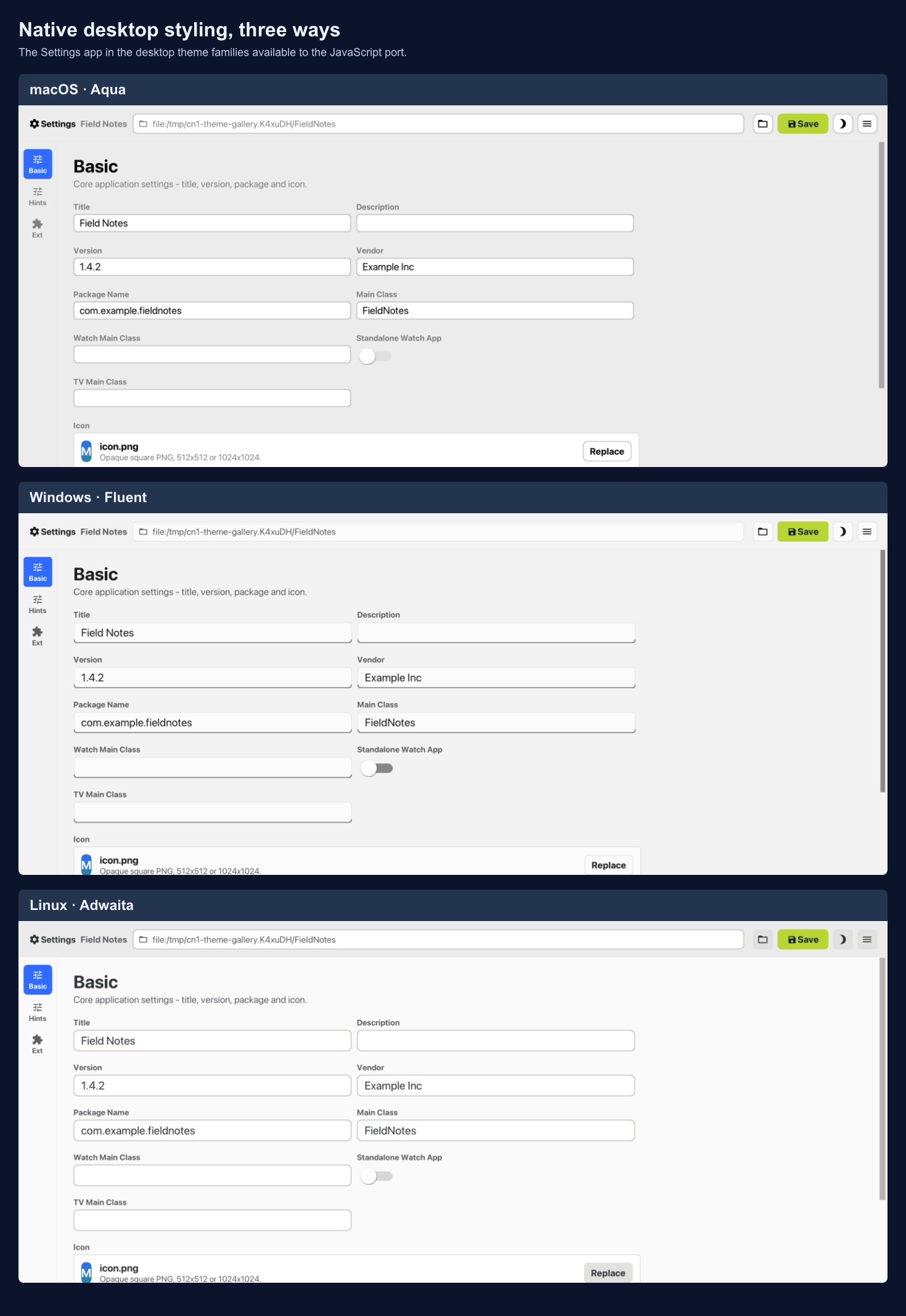
The Settings app shows the three desktop theme families now available in the JavaScript port.
Read street names along the road
There is a smaller maps improvement too: names now follow the road geometry, with curved glyph placement on bends and upright text along straighter sections. Labels remain above route overlays, so the route does not hide the street you need to follow.
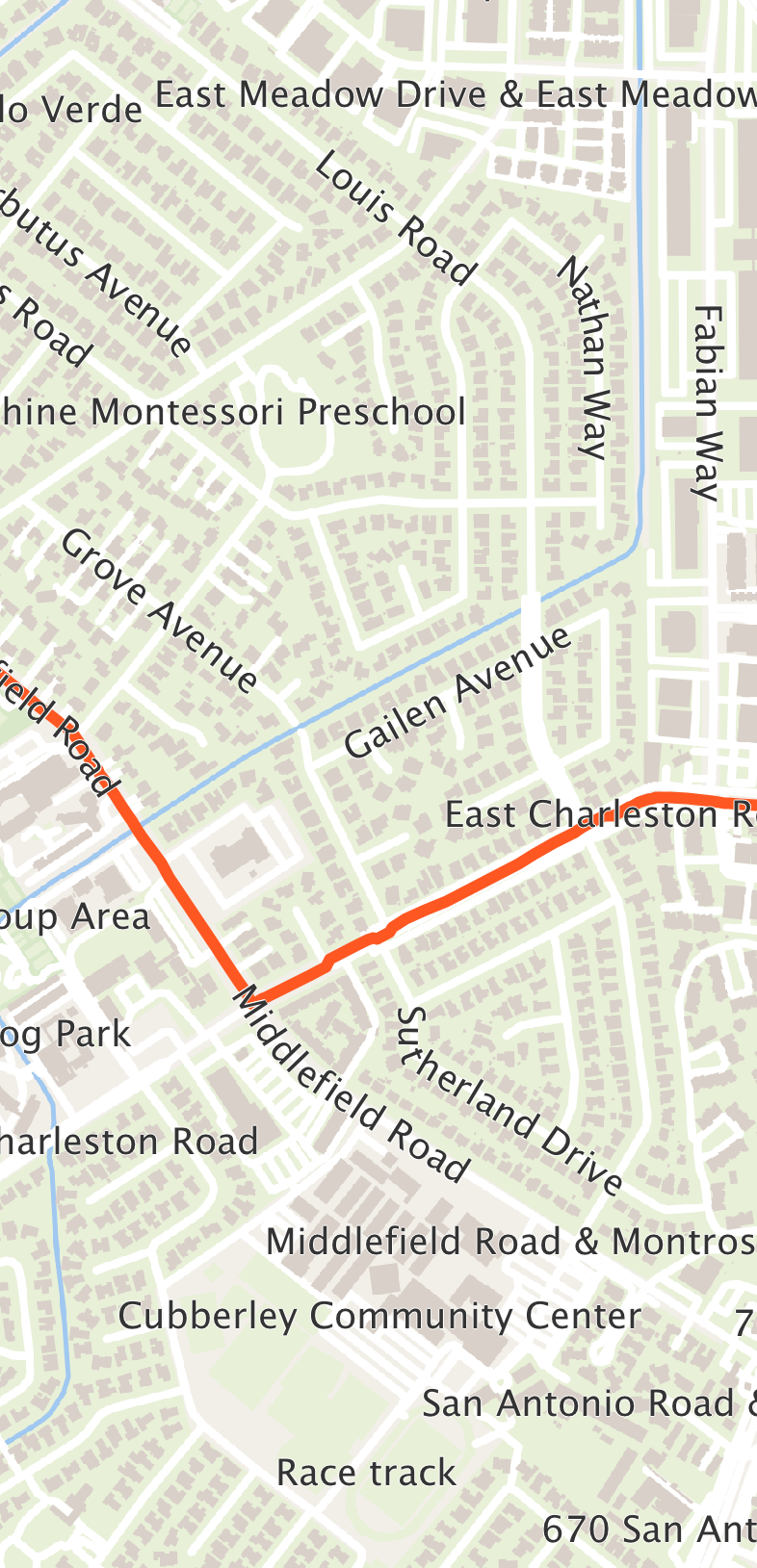
From the Maps guide. The renderer rejects placements that bend too sharply or collide with other labels.
This is part of the continuing vector-map work in PR #5902. The Maps guide covers the renderer and deeper zooming without stretching raster tiles.
Your release also has to survive submission
Thursday: Don't Order Fish on Monday. Don't Release on Friday
A working simulator or device build can still import an API that Apple rejects at submission. In this case, the unwanted imports appeared only when particular optional APIs were enabled, so most apps and our usual test configuration missed them. The new check looks for imported SDK symbols without public declarations, exercises optional feature combinations and inspects a linked Release device app. It catches a class of mistake that another happy-path test would miss.
This was a rough week of regressions around the optional Xcode 27 path, push, and windows. Some overlapped, so we thought we had fixed a bug only to discover its symptoms had moved. Thursday’s post explains one of those failures, why we release on Friday despite the obvious cost to our weekends, and how better gates can protect your release from ours. The Apple check has a defined scope; it cannot guarantee App Store acceptance.
There is a lot to try this week. There is also work to do on the reliability of getting it into your hands. I would like you to spend the next release testing something useful in your app, rather than helping us untangle a regression. That is why the gate work matters as much as the new features.
Discussion
What would you need to see before trying a smaller native Java backend for one of your services?