
Codename One has run on the desktop for a long time through the JavaSE target, which is the same engine that powers the simulator. What it did not have was a real native Mac binary, and the desktop output still carried a lot of phone-shaped habits: a drawn toolbar where the OS menu bar belongs, scrollbars you could not grab, no place in the menu for Preferences or Quit. With version 7.0.250 we finally have an actual native macOS application target that doesn’t bundle a JVM and is as native as our iOS target.
A native Mac build from the iOS pipeline
PR #5053 adds a Mac Native target that takes the existing project through the same build as the iPhone builder and the ParparVM pipeline that produces an iOS app. In this case it emits a native Mac variant of it.
We can find these targets in the standard maven menu in IntelliJ as “Mac Native Build” to send a build cloud build:

Or as “Mac Native Project” to generate an Xcode project:

These targets should work in the same way as the equivalent iOS targets.
Thanks to our switch to Metal the code for the native Mac build is very similar. That means the code of the Mac native target is mostly battle tested.
We use Mac Catalyst, which is an iOS/Mac porting framework from Apple. The user-facing name is “Mac native,” and a future phase might add an AppKit target sharing the same Metal renderer without changing the surface you build against.
One thing to keep in mind is that the iOS native interfaces would be the same for the desktop target, this might work out fine but in case it doesn’t you can use #ifdef to adapt code for the Mac target.
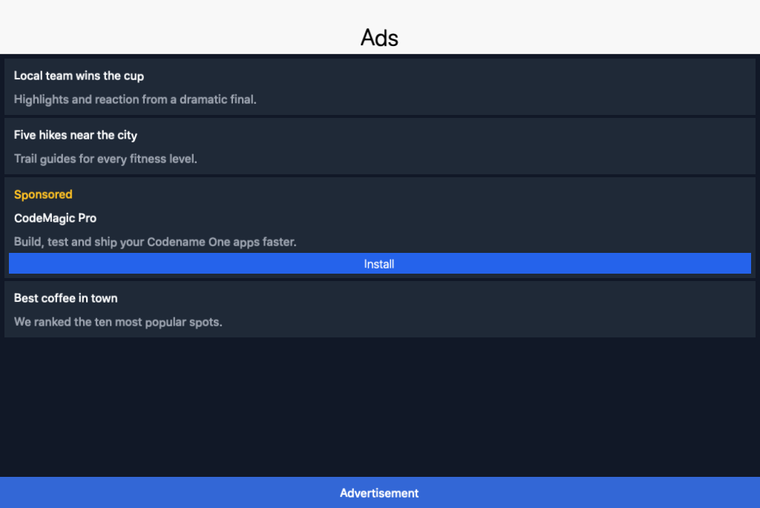
Here is a Codename One sample running as a native Mac app, the same Java code that produces the iOS and Android builds (it uses the new advertising API covered later this week):
Certificates
There’s one major gap with the Mac target: signing. Right now our certificate wizard, settings etc. are geared towards iOS/Android. Mac uses a different store and different signing tools. We didn’t update all of that infrastructure yet, and it might take some time to update. As a short-term solution, we support some build hints to configure this:
| Hint | Purpose |
|---|---|
codename1.mac.appid | Mac bundle identifier (the App Store Connect record is distinct from the iOS one). |
codename1.mac.certificate | Path to the .p12 containing the Mac signing certificate. Bundle both Mac App Distribution and Developer ID Application into a single P12 when targeting both channels. |
codename1.mac.certificatePassword | Password to unlock the P12. |
codename1.mac.provision | Path to the Mac .provisionprofile. |
Desktop integration
PR #5136 and the follow-up PR #5170 make a desktop target behave like a desktop app rather than a tablet app in a window. Everything here is opt-in, on by default for newly generated apps, and completely inert on mobile or when disabled. It spans the core plus desktop ports, JavaSE, Mac, and future ports.
Window chrome and the OS title bar
A new build hint chooses how the window is framed:
desktop.titleBar=native
In native mode the Codename One Toolbar is suppressed, the form title goes to the OS title bar, and your commands are bridged to a real native menu bar (a Swing JMenuBar that becomes the macOS screen menu on JavaSE, a UIMenuBuilder menu on Mac Catalyst). custom gives you an undecorated window with Codename One drawn caption buttons and window drag; toolbar keeps the classic behavior. Together these modes let you control how the app looks in a deeply customized way.
Commands land in the right menu
Instead of every command piling into one synthetic menu, a command can declare where it belongs:
Command prefs = Command.create("Preferences...", null, e -> showPreferences());
prefs.setDesktopMenu(Command.DESKTOP_MENU_PREFERENCES);
prefs.setDesktopShortcut(',', Command.DESKTOP_SHORTCUT_MODIFIER_PRIMARY);

Command save = Command.create("Save", null, e -> save());
save.setDesktopMenu(Command.DESKTOP_MENU_FILE);
save.setDesktopShortcut('s', Command.DESKTOP_SHORTCUT_MODIFIER_PRIMARY);
setDesktopMenu(...) takes any of DESKTOP_MENU_APP, ABOUT, PREFERENCES, QUIT, FILE, EDIT, VIEW, WINDOW, HELP, or a custom top-level title string, so Preferences and Quit show up where a Mac user expects them. setDesktopShortcut(...) attaches a keyboard accelerator; DESKTOP_SHORTCUT_MODIFIER_PRIMARY is Command on macOS and Control elsewhere, so the same code does the right thing on each desktop. The accelerator both appears next to the menu item and fires from the keyboard.
Interactive scrollbars
Desktop scrollbars are now grab-and-drag with a draggable thumb, click-track paging, and an always-visible track, following the macOS and Material conventions. The thumb shows its hover style under the pointer and its pressed style while dragged, and a minimum thumb size keeps it grabbable on very long content. This is gated by the interactiveScrollBool theme constant and uses dedicated Desktop* UIIDs, so mobile styling is untouched.
Desktop notifications
PR #5170 makes the standard LocalNotification API work on a real desktop build, not just in the simulator. On JavaSE a scheduled notification surfaces through a persistent system-tray icon as a native OS notification, and clicking it dispatches to your LocalNotificationCallback on the same code path mobile uses. Mac Catalyst keeps using the iOS notification path. The same notification code you already wrote for mobile now runs on the desktop.
Generated apps get this for free
New projects from the archetype and the Initializr default to desktop.titleBar=native with interactive scrollbars on, and the modern themes ship the Desktop* and Window* UIIDs in light and dark (macOS conventions in ios-modern, Material in android-material). If you have an existing app, opt in with the two hints above and check the new UIIDs against your theme.
This was validated end to end on both desktop builds: the JavaSE fat jar and the Mac Catalyst .app were each driven through the same AppleScript robot test for window title, menu placement, and native-menu command firing. The full Desktop Integration chapter in the developer guide covers the details.
The release post has the full week’s index. Tomorrow’s deep dive covers WebSockets, gRPC, and GraphQL in the core, the same theme of giving a Codename One app better ways to talk to the outside world.
Discussion
Join the conversation via GitHub Discussions.