
Last month I mentioned an option to enable UIScene in Codename One builds. We’ve tested that mode for the past month and with the coming update this Friday we will flip the default mode. This means that builds will implicitly set the build hint ios.uiscene=true instead of the current default of false. Ideally, this would have no impact on anyone…
However, if you do run into sudden issues after Friday the 25th of April 2026… It might mean you need to set the build hint to ios.uiscene=false and see if it works. If you’re experiencing a regression due to this change, then let us know ASAP.
To be clear: we are not doing this change lightly, this is a requirement from Apple, and we’re trying to get ahead of it so your App Store deployments won’t be disrupted.
Base64 Performance on iOS
In our previous episode we discussed the work we did on performance for Base64 support. That class represents the potential speed of Codename One in production. If we can make it fly, we can make any code fly. We indeed achieved stellar performance for Base64 on Android. On iOS, the story was more complicated where performance ended up 40 to 100% slower than native.
This week we were able to get Base64 to performance parity with native code. We were able to accomplish this using new ParparVM optimization hints that let us be more aggressive in methods where performance really matters.
ParparVM Gets New Performance Hints
A lot of performance work comes down to one uncomfortable truth: general-purpose safety has a cost.
Usually that is the right tradeoff. Safety checks, debug metadata, virtual dispatch, and conservative code generation are all there for a reason. They make the system easier to debug, safer to evolve, and more resilient when code does something unexpected.
But hot code paths are different.
In a tight loop, or in a method that executes millions of times in the course of a benchmark, even tiny overheads start to matter. A check that is harmless in normal code can become a measurable tax when repeated over and over again.
That is why ParparVM now supports several targeted optimization hints.
Method-Level Hints
We now support method-level code generation hints for native ParparVM output.
The first is:
@DisableDebugInfo
This suppresses generated line and debug metadata for the annotated method. That reduces generated C size and trims some debug-related overhead from the generated native code.
The second is:
@DisableNullChecksAndArrayBoundsChecks
This one is much more aggressive. It suppresses generated null checks and array bounds checks for the annotated method.
In the right place, that can make a very significant difference.
This is especially relevant for branch-heavy, low-level code where the input is already controlled, and the method is covered by tests. In those cases, repeatedly paying for defensive checks inside the innermost loop is often just wasted work.
Of course, this is not the sort of annotation you scatter around casually. These annotations trade diagnostics and runtime safety for speed, so they should be used surgically in code that is both performance-critical and well understood.
That is the key point here.
This is not about making the translator recklessly unsafe. It is about giving us the tools to be precise where precision matters.
@Concrete and Polymorphism
We also added:
@Concrete(name="fully.qualified.ConcreteClassName")
This is a class-level hint for native ParparVM output that lets us tell the translator that a base type always maps to a known concrete implementation at runtime. Most of you will probably never need this annotation since polymorphism by its nature doesn’t do that. However, the Codename One API was designed with OOP principles in mind. When we invoke any API we call a generic virtual method in CodenameOneImplementation these are usually overridden by the platform native implementation. Since the native implementation in iOS is always IOSImplementation we could define that as the concrete implementation of CodenameOneImplementation.
When we call a Codename One API in normal Java SE/Android the call would eventually link to the right virtual call since Java is great at dynamic dispatch. But ParparVM didn’t know that at compile time, so it couldn’t make that assumption. It needs to look up the function pointer for the method at runtime and always do a vtable lookup which is inefficient.
We now invoke IOSImplementation directly, and we can do that for all native implementation classes, which reduces a lot of overhead.
Typically, end user applications don’t have polymorphic classes like that. Even when they do have platform-specific polymorphism, the performance impact isn’t always worth the cost. So this feature is great, but probably not useful for you other than the performance gains you receive from it.
Material Icons Will Now Update Automatically
Another useful change in this release is that Material icon and font updates are now automated through CI.
This is the kind of maintenance task that we often postpone because it’s annoying to do by hand. Automating it means icon updates can happen regularly instead of depending on someone remembering to revisit them after a long gap (thank you to those dedicated community members who ask for this!).
That work is tied to the long-standing request to keep Material icons current.
There are two catches, though.
Google occasionally removes icons from the font. When that happens, we now follow suit and remove the associated constant. That is the only sane thing to do if we want the API surface to track the upstream icon set honestly.
The downside is that this can eventually lead to compilation failures in projects that still reference removed constants, such as icons that disappear upstream.
That is not ideal, but the alternative is worse: silently pretending an icon still exists when the source font no longer includes it.
The second problem is with newer icons. Google started encoding icons with values that exceed the 16bit char values used in Java. Currently, there’s only one such icon, and for now we decided to ignore that glyph.
The Picker Gets Quick Action Buttons
The Picker lightweight popup mode now supports custom action buttons as requested here.
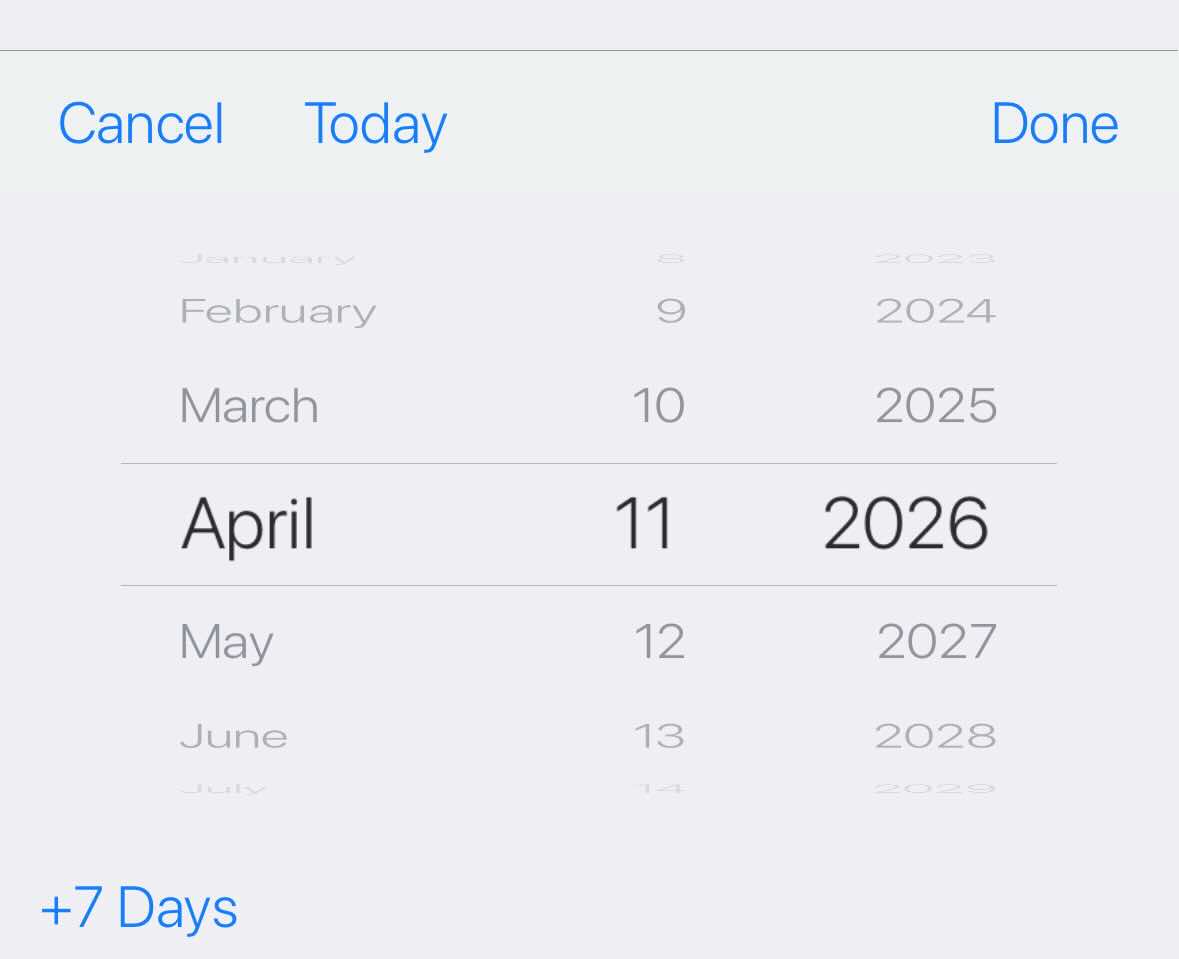
When using lightweight picker mode, scrolling wheels is fine for many cases, but sometimes the most common action is obvious like:
- “Today”
- “+7 Days”
- “Next Month”
In those cases, giving the user a direct shortcut is just a better UX.
For example:
Picker picker = new Picker();
picker.setType(Display.PICKER_TYPE_DATE);
picker.setUseLightweightPopup(true);
picker.setDate(new Date());

picker.addLightweightPopupButton("Today", () -> picker.setDate(new Date()));

picker.addLightweightPopupButton("+7 Days", () -> {
    Calendar cal = Calendar.getInstance();
    cal.add(Calendar.DAY_OF_MONTH, 7);
    picker.setDate(cal.getTime());
}, Picker.LightweightPopupButtonPlacement.BELOW_SPINNER);
We also support multiple placement options for those buttons:
BETWEEN_CANCEL_AND_DONEABOVE_SPINNERBELOW_SPINNER
This is a small API, but it can make date picking feel much more intentional in real apps.
TextArea Now Revalidates Its Parent More Reliably
We also improved TextArea so that when growByContent changes the row count, the parent revalidates properly as requested in this issue.
The main complexity here is in efficient UI reflow while typing, without disrupting existing functionality. We tried to be as smart as possible about it, but it’s a risky change.
Closing Thoughts
I closed the last blog post celebrating the reduction of issues below 500… We were down to 495 when I started writing this post, but now we’re back up to 500. Mostly due to RFEs that we submitted. Hopefully, we’ll still be able to put a dent into that moving forward.
When it comes to performance, our long-term goal is no longer to just get close enough to native. The goal is to beat native where it makes sense to do so. In principle, ParparVM should have some structural advantages in places where we can generate very direct code and avoid the sort of overhead native Objective-C or Swift often pays for ARC and dispatch. We are not fully there yet across the board, but the direction is very clear.
I think native platforms have “dropped the ball” on performance, UX, usability and developer friendliness. Thanks to modern tooling, we can do better.
Discussion
Join the conversation via GitHub Discussions.